You don't have to control SMS verification only through the workspace settings — you can turn it on or off for a specific document and a specific recipient, directly while preparing the document.
How to do it
On the Recipients page (signing scenario), click the gear icon next to a recipient. The recipient settings expand, including the SMS PIN section:
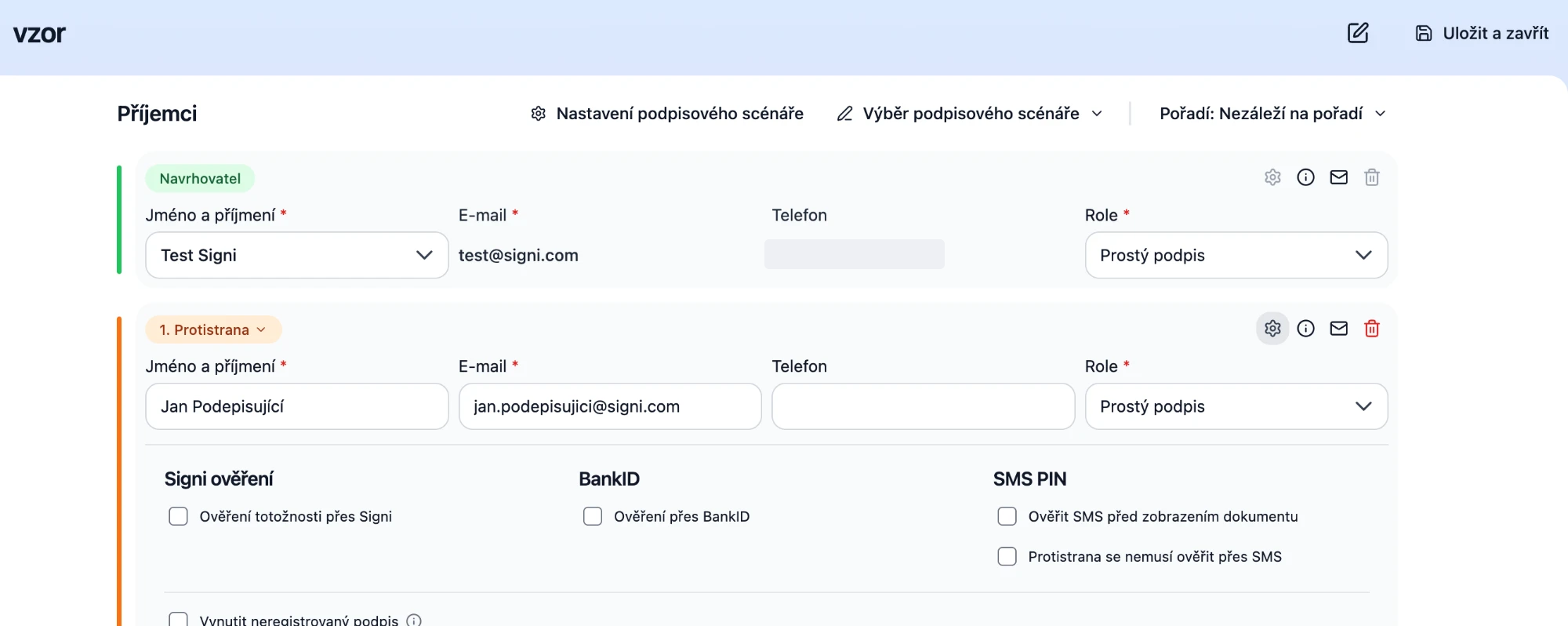
- Verify by SMS before viewing the document — the recipient must enter an SMS code before they can even see the document. Suitable for documents with sensitive data (e.g. a salary statement).
- The counterparty does not need to verify via SMS — disables SMS verification at signing for this recipient. Not recommended — SMS verification increases the trustworthiness of the signature.
The recipient-level setting overrides the workspace default behavior and applies only to this document. For an SMS to be sent, the recipient must have a phone number filled in.
In the same panel you'll also find other recipient verification methods — Signi verification (identity verification) and verification via BankID.
Verification before download
SMS verification before downloading a document is set for the entire workspace in the Security section; for an individual document it can be set by an integration via the API.
For integrators
The same can be sent per recipient via the API: sms_before_view, sms_before_sign and settings.sms_auth_before_download — see JSON for creating a document.
Where to go next
Was this article helpful?
That’s Great!
Thank you for your feedback
Sorry! We couldn't be helpful
Thank you for your feedback
Feedback sent
We appreciate your effort and will try to fix the article