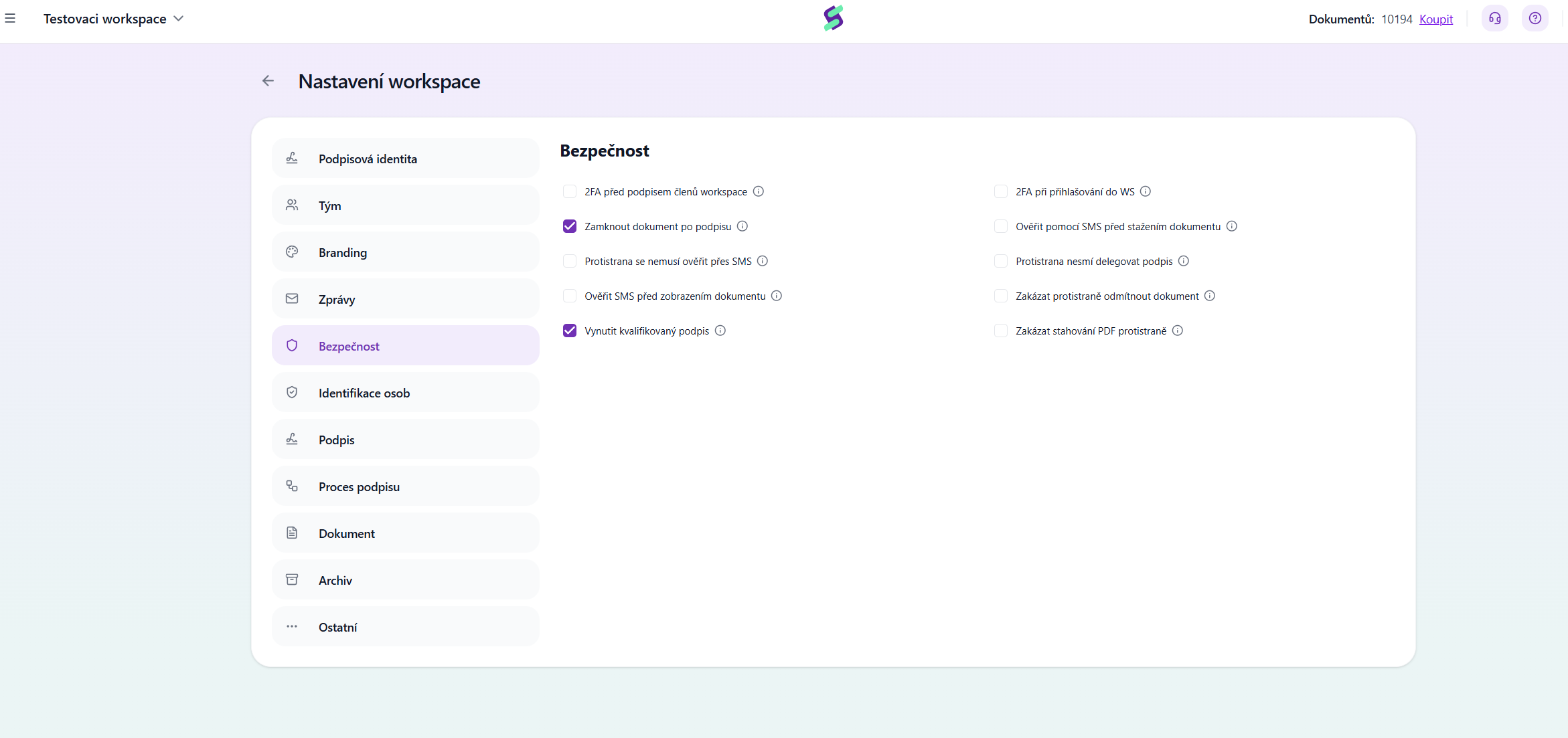
2FA before workspace members sign
Two-factor authentication via SMS code (PIN) is required when proposers sign.
Lock document after signing
The document will be locked after signing, which means no further signatures can be added to it. If you did not lock the document, it would be possible to upload it to Signi again and sign it once more.
Counterparty does not have to verify via SMS
The counterparty does not have to perform SMS verification (SMS security does not apply to them). Note: We do not recommend enabling this setting. SMS verification increases the trustworthiness of signatures.
Verify by SMS before displaying the document
Verification via SMS code is required before the document is displayed. This setting is suitable for documents containing sensitive personal data (e.g. a salary statement).
Enforce qualified signature
A qualified electronic signature (QES) is required. Once this option is checked, people will no longer be able to sign with so-called self-signed certificates (created by themselves, for example in Adobe), but only with certificates issued by a qualified certification authority (e.g. I.CA).
2FA when signing in to the WS
Two-factor authentication via SMS is required when signing in to the workspace.
Verify by SMS before downloading the document
Verification via SMS code is required before downloading the document. By default, you only need to click the Download button.
Counterparty cannot delegate the signature
The counterparty cannot delegate the signature to another person.
Prevent the counterparty from rejecting the document
The counterparty has no option to reject the document.
Prevent the counterparty from downloading the PDF
The counterparty cannot download the PDF version of the document. Note: To prevent the counterparty from downloading documents at all, you must also turn off attachments in the Messages section.
Tip: SMS verification can also be set for a specific document and recipient — see SMS verification for a document.
Was this article helpful?
That’s Great!
Thank you for your feedback
Sorry! We couldn't be helpful
Thank you for your feedback
Feedback sent
We appreciate your effort and will try to fix the article