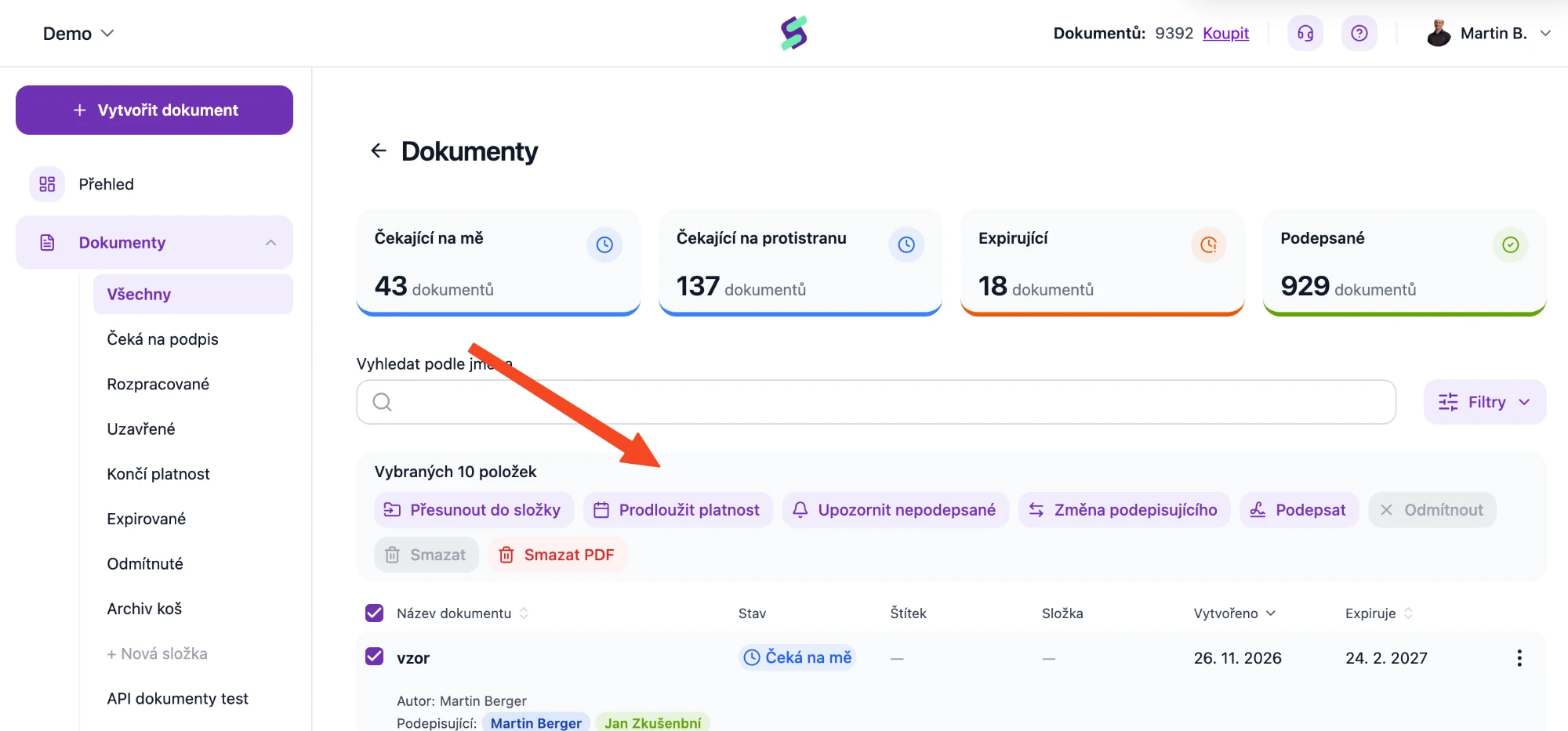
In the Documents overview you can handle multiple documents at once with a single action. Check the documents in the list — an action bar appears above it showing the number of selected items.
What can be done in bulk
- Move to folder — moves the selected documents to a chosen folder.
- Extend validity — extends the expiration of documents awaiting signature, see Extending expiration and resending a document.
- Notify unsigned — sends a reminder to everyone who has not yet signed the selected documents.
- Change signer — replaces the signer with another person, see Delegating signatures.
- Sign — bulk signing: in a single step you sign all selected documents that are awaiting your signature.
- Reject — bulk rejection of signing.
- Delete — removes the selected documents; you can then find them in the trash (Archive trash).
- Delete PDF — permanently deletes the document's PDF files including attachments and the signed version. The document record in the registry remains — useful for shredding sensitive content after the retention period expires.
The availability of actions depends on the status of the selected documents — an action that does not make sense for the current selection is greyed out. For example, Sign is active only for documents awaiting your signature.
Where to go next
- Sending multiple documents at once
- Campaigns in Signi — bulk sending of hundreds of documents
Was this article helpful?
That’s Great!
Thank you for your feedback
Sorry! We couldn't be helpful
Thank you for your feedback
Feedback sent
We appreciate your effort and will try to fix the article