The most common use: the document's counterparty must pass identity verification, otherwise they won't be able to sign. You set up verification when creating the document for a specific counterparty.
How to do it
- Create the document as usual and go to the Recipients step.
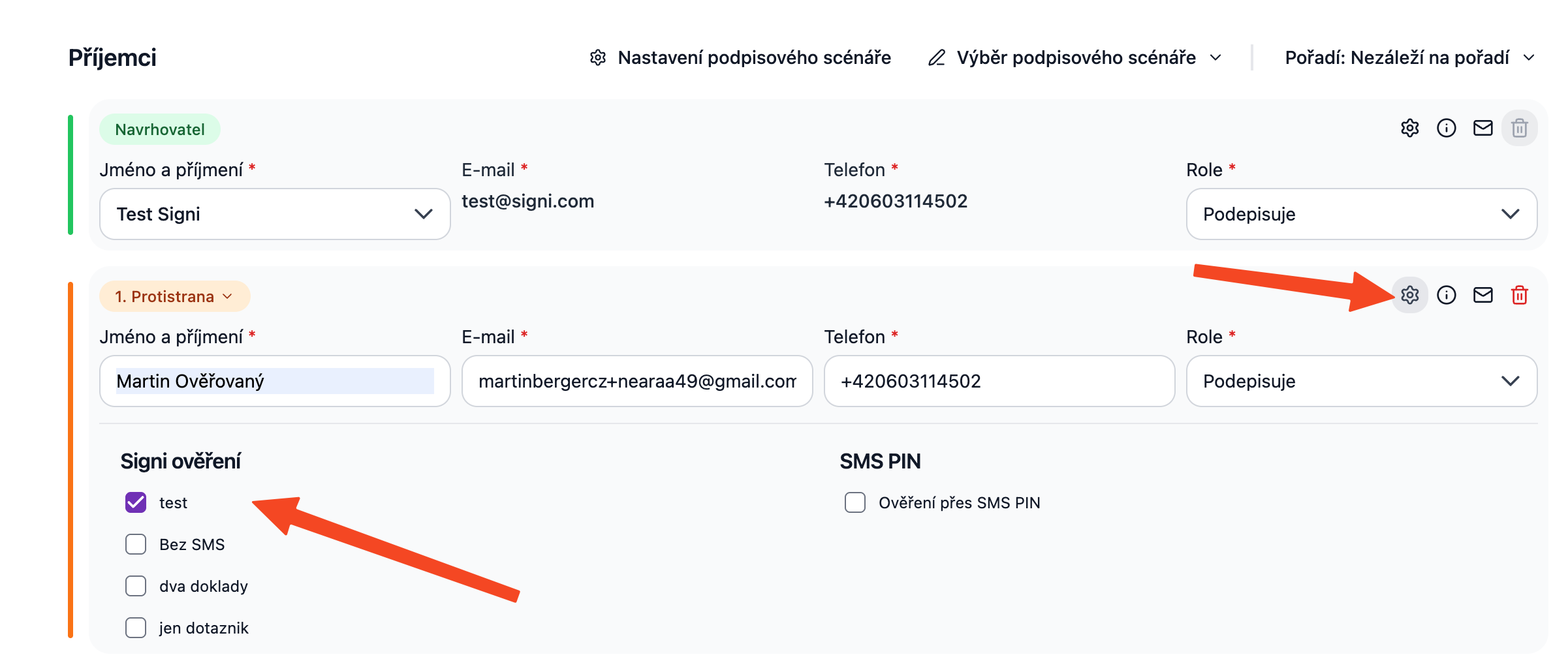
- Click the gear icon (recipient settings) next to the counterparty. The Signi verification section expands, showing a list of your verification groups.
- Check the group the counterparty should pass. You can check up to two — the counterparty then chooses which path to verify through.
- Continue to the document content and send it.
When a group has Automatically add when creating a document enabled, it is pre-filled for counterparties.
What happens after sending
- The counterparty receives an email; instead of going straight to signing, Signi first guides them through verification.
- In the document detail you can see the counterparty's verification status (Waiting / Verification in progress / For review / Approved…) and you can Resend the request.
- When the counterparty completes the checks, they can continue straight to signing — they don't wait for your approval. In the meantime, you review and approve the verification.
When the counterparty is already verified
Signi reuses valid verifications: if a contact has an approved verification from the same group that is still valid, the counterparty doesn't go through the checks again — the document goes straight to signing. When verification is requested again is governed by the group's validity and the re-verification threshold in the workspace settings.
If the contact currently has a verification in progress, the app will notify you: "The contact already has a verification in progress. Starting another will create a new run." Usually it's enough to wait for the existing one to finish.
Where to go next
- Reviewing and approving verification
- Verification from a contact — verification without a document, "in reserve"
- For integrators: Verification with a document via API
Related terms: remote identification · distance verification · counterparty identity verification
Was this article helpful?
That’s Great!
Thank you for your feedback
Sorry! We couldn't be helpful
Thank you for your feedback
Feedback sent
We appreciate your effort and will try to fix the article