This service is the ideal solution for companies and individuals looking for a reliable and trustworthy service for electronically signing documents without the need for a long-term commitment. In this article, we'll explain what the Pay as You Go service offers, how it works, and what benefits it brings.
What is the Pay as You Go service?
Pay as You Go is a payment model in Signi that lets you pay only for the services you actually use. Users pay no monthly or annual flat fees — they only pay for the documents they send for signing.
This model is ideal especially for:
- users with irregular signing needs,
- smaller companies and startups,
- one-off or short-term projects,
- individuals who don't want a long-term commitment.
How does Pay as You Go work?
Using the service is simple and quick:
- Register for the Signi app at: https://app.signi.com/register
- There's no need to arrange a monthly plan or long-term subscription.
- Upload the documents to be signed.
- Set up a signing scenario according to your needs (number of signers, order of signatures, etc.).
- Send the document for signing and pay only for the documents that are actually signed.
The validity of purchased documents is not limited, which ensures maximum flexibility.
How can I purchase the Pay as You Go service?
The purchasing process is very simple:
On the Signi home page, click the "Buy" button.

A page with annual and monthly subscription offers will open. Scroll down the page to view the Pay as you go offer.
In the "Pay as You Go plan" section, choose the option based on the number of documents you want to purchase.
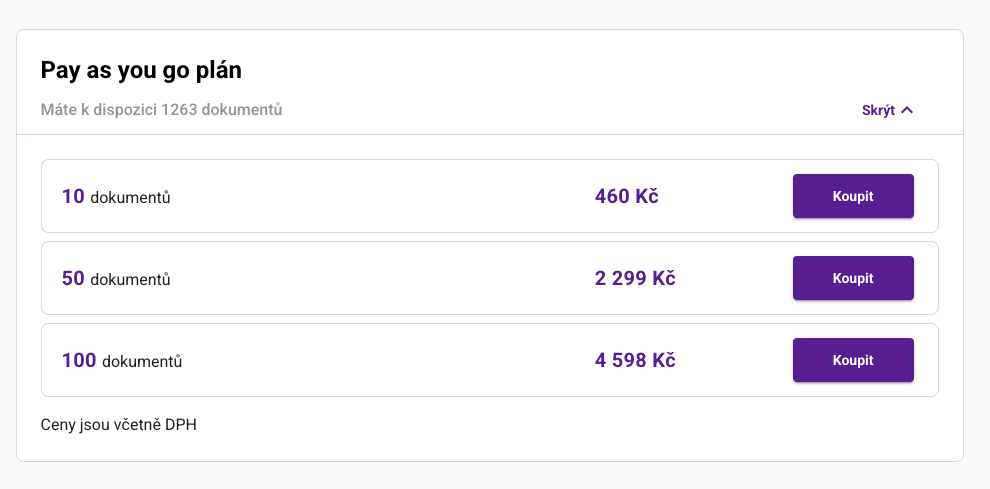
Next, fill in your billing details and payment card number. The purchase is processed through a secure payment gateway, which ensures a smooth and secure payment process.
Once the order is complete, you can start using the documents right away.
Main benefits of Pay as You Go
- no long-term commitment,
- you pay only for what you actually use,
- ideal for irregular or one-off signing,
- quick activation without complicated setup,
- full access to the key electronic signing features in Signi.
Was this article helpful?
That’s Great!
Thank you for your feedback
Sorry! We couldn't be helpful
Thank you for your feedback
Feedback sent
We appreciate your effort and will try to fix the article