Sometimes the signing process needs to change according to the current situation. In this case, the signing of the document is split into several steps.
For example, you don't know in advance who will sign on behalf of the supplier. So you create a document where your side's representatives sign, but you choose that the document will not be locked. Once it becomes clear who will sign on the counterparty's side, you download the document, create a new signing scenario, and send it to the supplier.
The document is first handed over to the 1st signer, then the document with one signature is handed over to the 2nd signer, and so on. In this process, when the first signers sign, the document must not be locked against changes, so that subsequent signatures can be inserted into it. The content of the document does not change during this.
Only when the last signer signs does the document become locked against changes.
- How to sign in multiple steps in Signi?
- How does this appear in the documents?
- What happens if you try to add a signature to an already locked document?
- Can something like this also be done from an integrated application?
How to sign in multiple steps in Signi?
When setting up the signing scenario for the first signers, Lock document MUST NOT be checked in the signing scenario setup.
When setting up the signing scenario for the last signer, Lock document MUST be checked in the signing scenario setup.
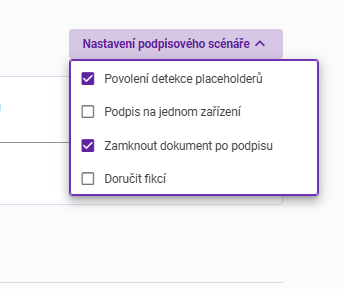
Should the document be locked against further changes after all signers have signed? The default value is yes.
How does this appear in the documents?
You can track how the document changes during multi-step signing, for example in Adobe Reader.

In the first signing steps, it is not visible, e.g. in Adobe Reader, that the document is locked against further changes.

In the final document, e.g. in Adobe Reader, besides all the signatures, you can also see that the document is locked against further changes.
What happens if you try to add a signature to an already locked document?
If you upload a document to Signi that is already locked against changes, Signi will return an error. If someone sent you such a file, you need to ask them to resend it WITHOUT locking against changes. This does not concern changes to the document's content, but changes to related information such as signatures, seals, and timestamps.
The actual content of the document remains unchanged throughout the entire signing process.

If you upload a document to Signi that is already locked against changes, Signi will return an error.
Can something like this also be done from an integrated application?
Yes, it can — the document is created via the API with the setting lock_after_seal: false, see the Signi API documentation and Document security — seals and locking.

Was this article helpful?
That’s Great!
Thank you for your feedback
Sorry! We couldn't be helpful
Thank you for your feedback
Feedback sent
We appreciate your effort and will try to fix the article